6. Functions
6.1. Preliminary exercises
Exercise 6.1 Preparation: Stepping through function calls
It is essential that you understand how functions work and how values are passed from caller to function (through arguments) and from function back to caller (through return).
1a Copy-and-paste the program A (see below) in the online visualiser (http://www.pythontutor.com/visualize.html#mode=edit). Make sure Python 3.6 (not Python 2.7) is selected and press ‘Visualise Execution’. Now you can take single steps through the code with ‘Forward’.
Don’t worry if the purpose of the programs does not make sense to you. They were only written to illustrate the mechanisms behind function call/return.
Answer the following questions after every step (‘Forward’ press):
Why is/was this line of code the next to be executed?
Why do the variables have the values (shown on the right)?
Why do some variables ‘disappear’ after certain steps?
Program A:
# demo program A

def some_function(var_x, var_y):
    var_x = var_x * var_x
    var_y = var_y * 2
    var_z = var_x + var_y
    return var_z

def main():
    # try some_function with different arguments
    result1 = some_function(2, 3)
    result2 = some_function(-1, -5)
    print("result1 and result 2 are:", result1, result2)

main()
1b. Do the same as 4a. for program B, with a function with repetition in it. Try to answer questions 1, 2, 3 with _every_ step.
# demo program B

def print_reverse_float_range(lower, upper, step):
    # print 1/x for a range of float values between lower and upper
    current = lower
    while current < upper:
        value = 1 / current
        print("value of 1 /", current, ":", value)
        current += step
    return

def main():
    # try print_reverse_float_range with different arguments
    print_reverse_float_range(2.5, 2.8, 0.1)
    print_reverse_float_range(2.0, 4.0, 0.5)

main()
Exercise 6.2 Preparing your bag lunch
Functions can be effectively used to avoid code duplication. In this exercise you will convert duplicated code into shorter more flexible code using functions.
Imagine a recipe for making a ‘bag lunch’ of 3 cheese sandwiches, 2 jam sandwiches, an apple, banana and a coconut. The original recipe program is as follows:
print("prepare bag lunch")
print()
print("make 3 cheese sandwiches")
print("take first slice of bread ...")
print("put cheese on it")
print("cover cheese with a slice of bread")
print("take first slice of bread ...")
print("put cheese on it")
print("cover cheese with a slice of bread")
print("take first slice of bread ...")
print("put cheese on it")
print("cover cheese with a slice of bread")
print()
print("make 2 jam sandwiches")
print("take first slice of bread ...")
print("put jam on it")
print("cover jam with a slice of bread")
print("take first slice of bread ...")
print("put jam on it")
print("cover jam with a slice of bread")
print()
print("adding fruits")
print("add one apple")
print("add one banana")
print("add one coconut")
You can copy the program and see what the output is.
2a Avoid repetition: Define functions make_cheese_sandwich(), make_jam_sandwich() and add_fruit(fruit) and use these to get a shorter, more elegant program. Test it to see if it gives the same output.
2b Use parameters: Merge functions make_cheese_sandwich(), make_jam_sandwich() into one function make_sandwich(topping, nr_of_sandwiches) to make your program much more flexible. Test it to see if it gives the same output.
2c Put all parameter calls in a main() function. Test it.
Exercise 6.3 Number multiplication
3a. Write a function multiply(numbers) that takes a list of numbers and returns the multiplication of all numbers in the list. Test your function for [-1, 2, -3, 4, -5], [42] and [-10, 15, 0, 347].
3b. Prove that multiply(numbers) gives the correct result by adding a function test_function(numbers, correct_answer) that prints whether multiply(numbers) returns the correct answer or not. Use your test function to test multiply(numbers) for the same values as a. Here is a sample run:
test passed for numbers [-1, 2, -3, 4, -5] and answer -120
test failed for numbers [42] and answer 41
test passed for numbers [-10, 15, 0, 347] and answer 0
6.2. Programming exercises
Exercise 6.4 Pentagonal numbers
The pentagonal number are defined as the corners of stacks of pentagons. The figure below shows the first 5 pentagonal numbers.
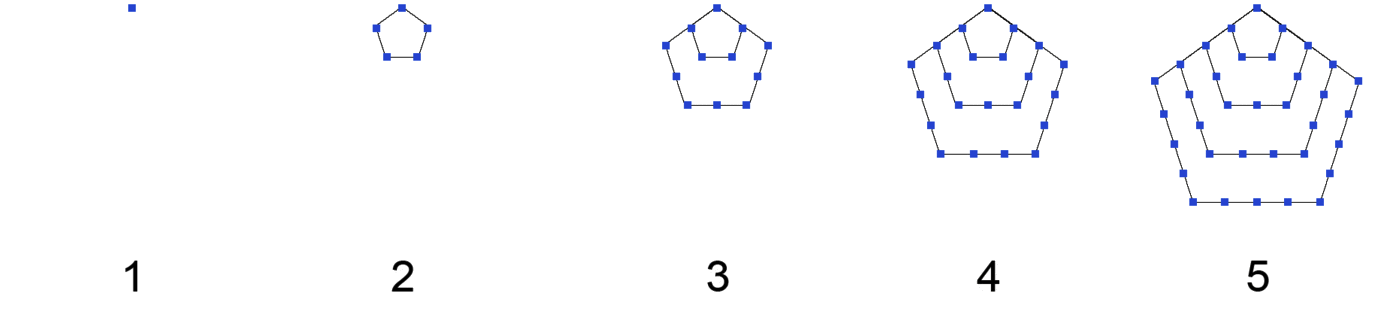
They are determined by this formula: \(\frac{3n^{2} - n}{2}\) for n = 1, 2, 3 etc. The first few numbers are 1, 5, 12, 22, ..
4a. Write a function with the following header that returns a pentagonal number:
def get_pentagonal_number(n):
4b. Write a test program that uses this function to display the first 10 pentagonal numbers.
Exercise 6.5 Summing the digits of an integer
5a. Write a function that computes the sum of the digits in an integer. For example, sum_digits(234) returns 9 (= 2 + 3 + 4).
Use the following function header:
def sum_digits(number):
There is more than one strategy to solve this. Two examples:
Use the % operator to extract digits, and the // operator to remove the extracted digit. For instance, to extract 4 from 234, use 234 % 10 (= 4). To remove 4 from 234, use 234 // 10 (= 23). Use a loop to repeatedly extract and remove the digits until all the digits are extracted.
Convert the number into a string, convert the individual characters into integers (the digits of the original number) and sum these.
5b. Write a test program that tests the function with various numbers.
Exercise 6.6 Safe version of the list index function.
If you use the list.index(item) function it can crash if the item is not in the list.
6a. Write a function with the following function header that will return the index if the item is in the list, but -1 if it is not.
def safe_index(lst, item):
6b. Write a small test program to show that your code works and does not crash if you enter a value that is not in the list. You can choose the type of list and data types yourself.
Exercise 6.7 Select safely from a list of values.
7a. Write a function with the header below that prompts the user to choose between the values of a list. Let the user enter a choice and check if the item is in the list until the input is one of the items in the list.
def safe_select(lst):
...
return item # one of the items of the list
7b. Write a small test program to let the user choose a favourite color from the colors of the rainbow.
Here is a sample run:
What is your favourite color?

Please select a value from this list:
['red', 'orange', 'yellow', 'green', 'blue', 'indigo', 'violet']
choice: white

white is not in the list:
choice: black

black is not in the list:
choice: yellow

You have chosen yellow, thank you!
Exercise 6.8 Cleaning Up Data
In Data Science observations are not always perfect. Sometimes values are missing in a series.
In that case a value of None represents the place where a value is missing. For example:
raw_data = [None, None, 1.0, 4.0, None, 6.0, 8.0, None, None, 10.0, None]
Write a function clean_up(raw_data) that takes a list of float values and returns a list with all None values removed or replaced by a float number:
all None values at the beginning of the list need to be removed
all None values at the end of the list need to be removed
all None values in the middle of the list with a valid number on the left and on the right need to be replaced by the average of the left and right “neighbour” (interpolate).
two or more consecutive None values in the middle of the list need to be removed (if two or more numbers are missing it is too much to interpolate).
As an example, the following snippet:
clean_data = clean_up(raw_data)
print(clean_data)
should give this output:
[1.0, 4.0, 5.0, 6.0, 8.0, 10.0]
Exercise 6.9 Word Reading Experiment
In recent years understanding of the cognitive processes involved in text reading has had a number of breakthroughs, for example typoglycemia (https://en.wikipedia.org/wiki/Typoglycemia), the ability to still understand words even if not all the letters of a word are in place.
Let’s try a simplified version of the classic typoglycemia experiment: can you still read an unknown text if you only have the first and last letter of a word in place.
9a Complete the following program by adding a function first_last_letter that takes a word as a parameter and returns a string with only the first and last letter of that word.
# test reading of shortened words

# missing code here for function first_last_letter

def main():
    test_input = "Can you still read this text with only first and last letters ? Yes I can ! He can too ..."

    words = test_input.split(' ') # create list of words

    short_words = []
    for word in words:
        short_word = first_last_letter(word)
        short_words.append(short_word)

    # join is an easy way to glue strings together, separated by ' '
    test_output = ' '.join(short_words)
    print(test_output)

#start of program

main()
9b Change the function of 9a so that it returns with the first and last letter in place but all letters in between reversed.
Call this function reversed_word(word). For example,
reversed_word('reversed') == 'resreved'
and
reversed_word('abcdefgh') == 'agfedcbh'
6.2.1. Divide and Conquer
Exercise 6.10 Turtle Functions.
With turtle you can draw anything you want, but programs can become very long.
Functions can help to structure and shorten your code in an easy way.
10a Write a function (and a little test program) with the following header:
# Draw a line from (x1, y1) to (x2, y2)
def drawLine(x1, y1, x2, y2):
10b Write a function (and a little test program) with the following header:
# Write a string s with bottom-left location (x, y)
def writeText(s, x, y):
10c Write a function (and a little test program) with the following header:
# Draw a point (filled circle with radius 3)
# at the specified location (x, y)
def drawPoint(x, y):
10d Write a function (and a little test program) with the following header:
# Draw a circle with center (x, y) and specified radius
def drawCircle(x, y, radius):
10e Write a function (and a little test program) with the following header:
# Draw a rectangle with center (x, y)
# with the specified width and height
def drawRectangle(x, y, width, height):
10f The final test!
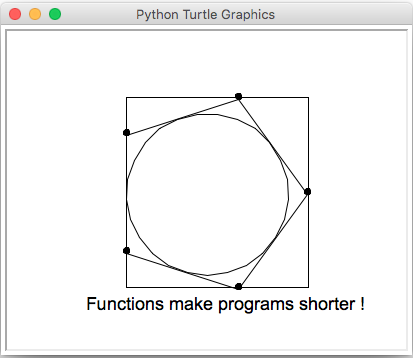
Show that the following main() function produces the figure below.
def main():
    # Draw a pentagon
    drawLine(100, 0, 31,-95)
    drawLine(31, -95, -81,-59)
    drawLine(-81, -59, -81, 59)
    drawLine(-81, 59, 31, 95)
    drawLine(31, 95, 100, 0)

    # Draw points at the corners of the pentagon
    drawPoint(100, 0)
    drawPoint(31, -95)
    drawPoint(-81, -59)
    drawPoint(-81, 59)
    drawPoint(31, 95)

    # Draw a circle at (0, 0) with radius 80
    drawCircle(0, 0, 81)

    # Draw a rectangle at (0, 0)
    # with width 60 and height 40
    drawRectangle(10, 2, 182, 190)

    # Write text at (-50, -60)
    writeText("Functions make programs shorter !", -120, -120)

    turtle.hideturtle()
    turtle.done()
Exercise 6.11 Finding Rhyme in Poetry
Through the ages rhyme has been associated with special meaning to texts.
Here is part of a famous poem by William Shakespeare:
Shall I compare thee to a summer’s day?
Thou art more lovely and more temperate.
Rough winds do shake the darling buds of May,
And summer’s lease hath all too short a date.
Sometime too hot the eye of heaven shines,
And often is his gold complexion dimmed;
And every fair from fair sometime declines,
By chance, or nature’s changing course, untrimmed;
In this poem the end words ‘day’ and ‘May’ rhyme because they share the same letters at the end (‘ay’). In this exercise Rhyme is simply defined as ‘sharing two or more letters at the end’. (Pronunciation is ignored here. For that reason the end words ‘temperate’ and ‘date’ are also a pair of rhyme words.)
In this question you are going to write a program that finds pairs of rhyme words (at the end of the sentences).
You may assume the poem text is stored as a list of strings called poem.
poem = ["Shall I compare thee to a summer's day?",
    "Thou art more lovely and more temperate.",
    "Rough winds do shake the darling buds of May,",
    "And summer's lease hath all too short a date.",
    "Sometime too hot the eye of heaven shines,",
    "And often is his gold complexion dimmed;",
    "And every fair from fair sometime declines,",
    "By chance, or nature's changing course, untrimmed;"]
We will build up the program step by step.
11a. Remove End Punctuation
Write a function remove_end_punctuation(sentence, punctuation) that removes all punctuation marks from the end of string sentence and returns the result.
For this question we use punctuation marks:
punctuation = ['.', ',', ';', '?', '!', ':']
All punctuation marks that are not at the end should not be removed.
As an example, this code:
sentence = 'By chance, or nature's changing course, untrimmed;'
removed = remove_end_punctuation(sentence, punctuation)
print("sentence without end punctuation:")
print('" + removed + "'")
should give this output:
sentence without end punctuation:
'By chance, or nature's changing course, untrimmed'
11b. Get Last Word
Write a function get_last_word(sentence) that returns the last word from input string sentence.
The return value (last word) may not contain spaces.
You may assume in this function that string sentence does not contain punctuation at the end.
As an example, this code:
sentence = 'Rough winds do shake the darling buds of May'
last = get_last_word(sentence)
print("the last word is '" + last + "'")
should give this output:
the last word is: 'May'
11c. Get All Last Words
Write a function get_all_last_words(poem) that uses functions remove_end_punctuation and get_last_word to return a list with all last words of the poem.
As an example with the Shakespeare poem, get_all_last_words(poem) should return:
['day', 'temperate', 'May', 'date', 'shines', 'dimmed', 'declines', 'untrimmed']`
11d. Check Rhyme
Write a function check_rhyme(word1, word2) that returns True if strings word1 and word2 share two or more identical letters at the end and returns False otherwise.
For example,
check_rhyme('raid', 'maid')
should return True,
check_rhyme('may', 'soya')
should return False and
check_rhyme('face', 'case')
should also return False.
11e. Show all Rhyme Pairs
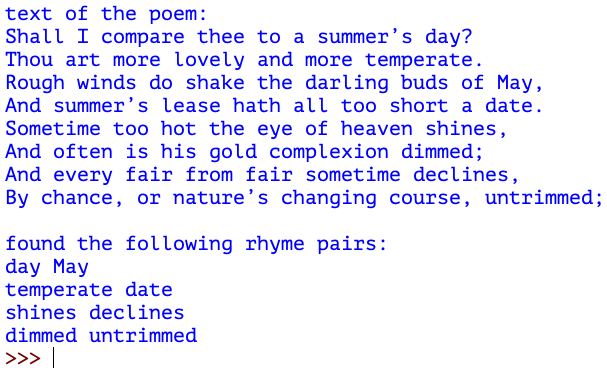
Write a program (using the functions from 10a. - 10d.) that:
shows the original poem text;
shows all pairs of last words that rhyme in a poem.
Here is the output of a sample run with the Shakespeare poem:
Exercise 6.12 Analysing Text
Python is very well suited for analysing texts. In this question we will build a small program to analyse some basic features of written language: words, their separators (spaces and interpunction), and acronyms.
12a Count the Separators
Write a function number_of_separators(text, separators) that takes a string text and a list of characters separators as parameters and returns the number of separators found in the text.
This example code:
separators = ['.', ',', ';', ':', '?', '!', ' ']

text1 = 'Here are 7 words, and 8 separators.'
nr1 = number_of_separators(text1, separators)
print(nr1)

text2 = '... hi, aaand  goodbye;did I forgot 1 space?? lol'
nr2 = number_of_separators(text2, separators)
print(nr2)
should have output:
8
16
12b Count the Words
Write a function number_of_words(text, separators) that returns the number of words (the sequences of characters between the separators).
This example code:
separators = ['.', ',', ';', ':', '?', '!', ' ']

text1 = 'Here are 7 words, and 8 separators.'
nr1 = number_of_words(text1, separators)
print(nr1)

text2 = '... hi, aaand  goodbye;did I forgot 1 space?? lol'
nr2 = number_of_words(text2, separators)
print(nr2)
should have output:
7
9
12c Expand the Acronyms
Write a function expand_acronyms(text, acronyms) that expands the acronyms in a text and returns the expanded text.
Variable acronyms is a dictionary of key-value pairs: acronym - expansion.
If no acronyms are found the original input text should be returned.
This example code:
acronyms = {'fyi': 'for your information',
        'imho': 'in my humble opinion',
        'ty': 'thank you'}

text1 = 'Here are 7 words, and 8 separators.'
expanded1 = expand_acronyms(text1, acronyms)
print('expanded text: "' + expanded1 + '"')

text2 = '... hi, aaand  goodbye;did I forgot 1 space?? lol'
expanded2 = expand_acronyms(text2, acronyms)
print('expanded text: "' + expanded2 + '"')
should have output:
expanded text: "Here are 7 words, and 8 separators."
expanded text: "... hi, aaand  goodbye;did I forgot 1 space?? laughing out loud"
12d Menu Driven Program
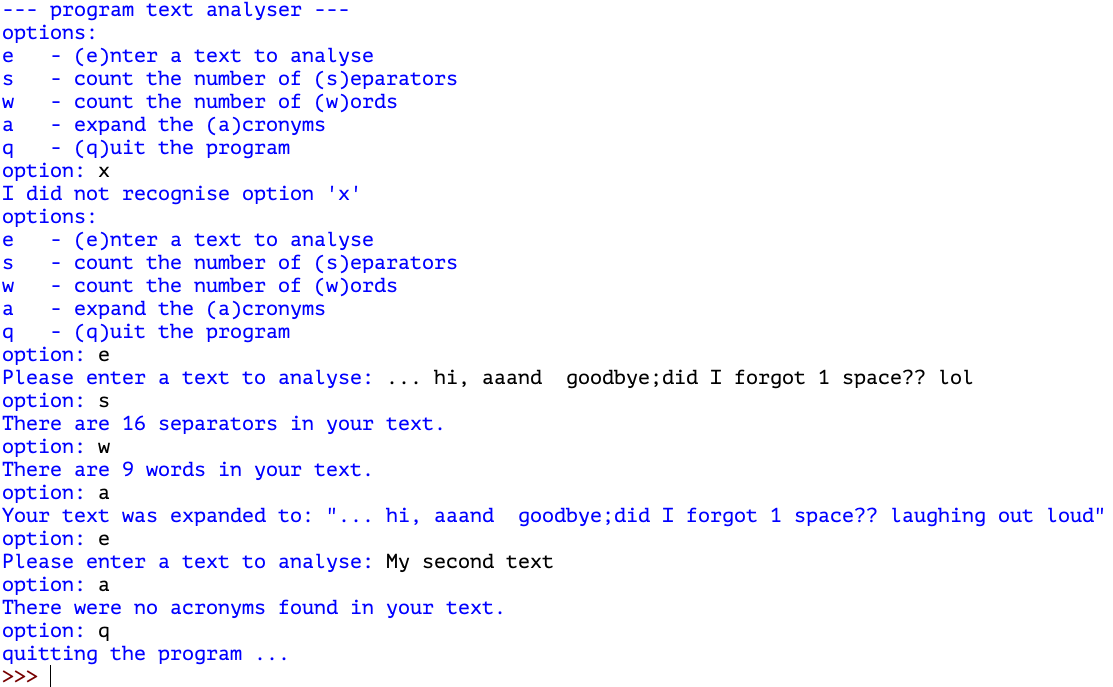
Write a menu driven program that uses functions number_of_separators(), number_of_words() and expand_acronyms().
There should be menu options:
e - enter the text to be analysed/expanded
s - to count the number of separators
w - to count the number of words
a - to expand acronyms
q - to quit the program
Further requirements:
The program should show all options at the start
The program should continue to ask for an option until the user enters ‘q’
If the option is not recognised the program should notify the user (but not quit)
The text entered should be stored in a variable so that s, w and a could be performed on the same text without the user having to enter the same text multiple times
The separators and acronyms may be stored in variables at the start of the program
Here is a sample run:
© Copyright 2022, dr. P. Lambooij
last updated: 02-10-2022