5. Lists
5.1. Preliminary exercises
5.1.1. Lists
You will learn the most from the exercises in this section, if you check your answers in this order: (1) check if you can find your answer in the reader, (2) try it out in a .py script or in the interactive window.
Exercise 5.1 List creation
How do you create an empty list?
How do you create a list with the three integers 1, 32, and 2?
Exercise 5.2. Given my_list = [30, 1, 12, 14, 10, 0]
How many items are in my_list?
What is the index of the first item in my_list?
What is the index of the last item in my_list?
What is my_list[2]?
What is my_list[-2]?
Exercise 5.3 What is the value of my_list after applying each of the following statements? Every statement starts with my_list = [5, 1, 2, 1, 0].
my_list.append(40)
my_list.insert(1, 43)
my_list.extend([1, 43])
my_list.remove(1)
my_list.sort()
my_list.reverse()
random.shuffle(my_list)
Exercise 5.4 Given my_list = [11, 5, 7, 5, 3], what is the value of var1 through var6 after the following statements?
var1 = my_list.index(3)
var2 = my_list.count(5)
var3 = len(my_list)
var4 = max(my_list)
var5 = min(my_list)
var6 = sum(my_list)
Exercise 5.5 What is the value of my_list after the following statements? Every statement starts with list1 = [5, 1, 2, 1, 0] and list2 = [1, 3, 6].
my_list = list1 + list2
my_list = 2 * list2
my_list = list2 * 2
my_list = list1[1 : 3]
my_list = list1[3]
Exercise 5.6 Write statements to do the following (in the ‘smart’ way):
Create a list with 20 values of 2.5.
Assign the value 5.5 to the last element in the list.
Display the sum of the first two elements.
Compute the sum of the first five elements in the list.
Find the minimum element in the list.
Randomly generate an index and display the element of this index in the list.
Exercise 5.7 What happens when your program attempts to access a list element with an invalid index (e.g. an index bigger than the number of items in the list)?
5.1.2. Repeating actions for all items in a list (for)
Exercise 5.8 Rewrite the following code so it uses a range instead of [0, 1, 2, 3, 4, 5].
for n in [0, 1, 2, 3, 4, 5]:
    print('I love to program!')
Exercise 5.9 Rewrite the following code using for - range instead of using a while.
n = 0
user_input = input("how many push-up do you want me to do? ")
nr_reps = int(user_input)
while n < nr_reps:
    print('push up!')
    n = n + 1
Exercise 5.10 What will the following code fragments display?
# 10a
for number in range(6):
    print(number)

# 10b
for number in range(2, 6):
    print(number)

# 10c
for number in range(0, 501, 100):
    print(number)

# 10d
for number in range(10, 5, -1):
    print(number)
Exercise 5.11 Suppose my_list = [‘apples’, ‘milk’, ‘cookies’, ‘bread’, ‘spaghetti’]. What will the following code fragments display?
# 11a
for item in my_list:
    print(item)

# 11b
for item in my_list:
    print(len(item * 2))

# 11c
for item in my_list[1:4]:
    if item == 'cookies':
        print('yummy!')
    else:
        print(item)

# 11d
my_list.reverse()
for item in my_list:
    print(item)
5.2. Programming exerises
Exercise 5.12 Suppose the student numbers of different studies at the TU/e have been recorded and stored in a list-of-lists nr_of_students:
nr_of_students = [
    ['study-year', 2014, 2015, 2016],
    ['Psy. & Tech.', 243, 298, 324],
    ['Informatics', 847, 939, 951],
    ['Mathematics', 148, 160, 194] ]
Write program fragments that:
print the nr of math students in 2014
print a list of all studies in nr_of_students
print the student nrs of ‘Informatics’ of all years in nr_of_students
print the nr of students of each study in 2015
prints the sum of numbers of students over the studies, for each separate year
Exercise 5.13 Magic Squares
Magic squares are squares with numbers from 1 to a certain number, that are ordered in such a way that the sum of each row, column and diagonal are equal. The picture below shows a well-known example of a magic square of size 3x3 (with numbers 1-9).
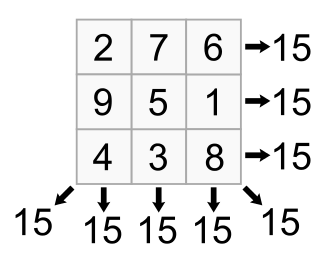
Squares like this can be encoded in a variable as a list-of-lists. Here is an example for the magic square in the figure above:
# example 1
square =  [[2, 7, 6], [9, 5, 1], [4, 3, 8]]
and another one that is not a magic square:
# example 2
square =  [[1, 2, 3, 4], [5, 6, 7, 8], [9, 10, 11, 12], [13, 14, 16, 15]]
In all parts of this exercise your code should work correctly with any value of ‘square’ (without changing the rest of the code).
13a. Write a small program that prints the square as an aligned table.
Here is sample output for example 1:
square:

2  7  6
9  5  1
4  3  8
and example 2:
square:

1  2  3  4
5  6  7  8
9  10 11 12
13 14 16 15
For simplicity you may assume that all the numbers in the square will always be smaller than 100 (max two digits).
13b. Print the totals of each row.
Here is sample output for example 1:
totals of square rows:
1: 15
2: 15
3: 15
and example 2:
totals of square rows:
1: 10
2: 26
3: 42
4: 58
13c. Print the totals of each column.
Here is sample output for example 1:
totals of square columns:

1: 15
2: 15
3: 15
and example 2:
totals of square columns:

1: 28
2: 32
3: 37
4: 39
13d. Print the total of the top-left to bot-right diagonal.
Here is sample output for example 1:
total of top-left to bot-right diagonal of square: 15
and example 2:
total of top-left to bot-right diagonal of square: 33
13e. Print the total of the top-right to bot-left diagonal.
Here is sample output for example 1:
total of top-right to bot-left diagonal of square: 15
and example 2:
total of top-right to bot-left diagonal of square: 34
13f. If the square is a magic square, then print ‘this is a magic square’; if not print ‘this is not a magic square’.
Here is sample output for example 1:
this is a magic square
and example 2:
this is not a magic square
Exercise 5.14 Symmetry in Matrices
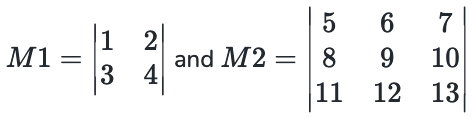
Matrices play an important role in the field of algebra. Matrix computations are often easier if there is some form of symmetry in the matrix. In this question you will write code that can evaluate whether a matrix has some sort of symmetry. Let a matrix be represented in Python by a list-of-lists. Here are two examples:
M1 = [[1, 2], [3, 4]]

M2 = [[5, 6, 7], [8, 9, 10], [11, 12, 13]]
represent matrices:
In all parts of this exercise your code should work correctly with any value of M (without changing the rest of the code).
14a. Print a Matrix
Print a matrix like in mathematics. Make sure that columns are aligned.
You may assume that the matrix is a ‘square’ (has an equal number of rows and columns) and that the numbers in the matrix are no more than 3 characters wide.
Here is an example for
M = [[-1, 1, 3], [1, 3, 5], [2, 0, -2]]
with output:
matrix:

| -1   1   3  |
|  1   3   5  |
|  2   0  -2  |
14b. Mirror Symmetry
A matrix is ‘mirror-symmetric’ if reversing the numbers in every row yields the same matrix.
By that definition matrices M1 and M2 above are not mirror-symmetric.
Here are two matrices M3 and M4 that are mirror-symmetric:
M3 = [[5, 6, 5], [8, 9, 8], [4, 7, 4]]

M4 = [[1, 0, 0, 1], [7, 2, 2, 7], [0, 4, 4, 0], [6, 6, 6, 6]]
Write a small program that reports whether a matrix M has mirror symmetry or not. Here is sample output for M1 and M4:
matrix:

|  1   2  |
|  3   4  |

this matrix is not mirror symmetric

matrix:

|  1   0   0   1  |
|  7   2   2   7  |
|  0   4   4   0  |
|  6   6   6   6  |

this matrix is mirror symmetric
14c. Diagonal Symmetry
A matrix is ‘diagonal-symmetric’ if switching the row and column positions of all numbers in the matrix yield the same matrix.
M1 and M2 above are not diagonal-symmetric. Here are two example matrices M5 and M6 that are diagonal-symmetric:
M5 = [[1, 2, 3], [2, 7, 4], [3, 4, 5]]

M6 = [[9, 1, 5, 2], [1, 7, 8, 4], [5, 8, 3, 6], [2, 4, 6, 1]]
Write a small program that reports whether a matrix M has diagonal-symmetry or not. Here is sample output for M2 and M6:
matrix:

|  5   6   7   |
|  8   9   10  |
|  11  12  13  |

this matrix is not diagonal-symmetric

matrix:

|  9   1   5   2  |
|  1   7   8   4  |
|  5   8   3   6  |
|  2   4   6   1  |

this matrix is diagonal-symmetric
Exercise 5.15 Higher-Lower Card Game
A popular card game (with optional drinking) is Higher-Lower, where you have to guess whether the next card from a closed deck has a higher or a lower value. In this exercise we program a variant with a simplified deck: only the cards 2-9 of one suit (e.g. hearts). Here is an example of a shuffled deck:
deck = ['7H', '5H, '9H', '4H', '6H', '3H', '8H', '2H']
Such a deck can be constructed with the use of the random.shuffle(…) method:
import random
deck = ['2H', '3H', '4H', '5H', '6H', '7H', '8H', '9H']
random.shuffle(deck)
print('shuffled deck =', deck)
You may use the code above in the exercises below.
15a Write code that reports if a card is higher or lower than the previous card. Here is a sample run:
shuffled deck = ['9H', '5H', '4H', '7H', '6H', '8H', '3H', '2H']
5 is lower than 9
4 is lower than 5
7 is higher than 4
6 is lower than 7
8 is higher than 6
3 is lower than 8
2 is lower than 3
15b Write code that counts and reports the number of cards that are higher and the number of cards that are lower than the previous card. Here is a sample run:
shuffled deck = ['4H', '7H', '8H', '9H', '3H', '5H', '6H', '2H']
There are 2 cards lower than the previous card.
There are 5 cards higher than the previous card
15c (challenge) program the complete drinking game
In the real world players are asked to guess if the next card is higher or lower. If the guess is wrong the player has to take a sip of his/her drink as penalty. Write code that asks a (single) player for a guess. The program should report the number of misses at the end of the round. Here is a sample run:
first card from the deck: 2

higher or lower? higher
next card from the deck: 5
You guessed it right!

higher or lower? higher
next card from the deck: 6
You guessed it right!

higher or lower? higher
next card from the deck: 4
You guessed it wrong ...

higher or lower? higher
next card from the deck: 9
You guessed it right!

higher or lower? lower
next card from the deck: 8
You guessed it right!

higher or lower? higher
next card from the deck: 7
You guessed it wrong ...

higher or lower? lower
next card from the deck: 10
You guessed it wrong ...

higher or lower? higher
next card from the deck: 3
You guessed it wrong ...

You have to take 4 sips of your drink.
Exercise 5.16 Statistics on measurements.
A useful skill for any scientist is to be able to script statistics on (measured) values. Let the user enter one number (measurement value) at the time until he or she enters ‘stop’.
16a Write a program that calculates and displays the highest value entered by the user. You may assume at least one value was entered. (Can you do it with only one repetition?). Here is a sample run:
enter a value or 'stop' 5.2
enter a value or 'stop' 7.3
enter a value or 'stop' -8.1
enter a value or 'stop' stop
the highest value = 7.3
16b Write a program that calculates and displays the highest and second highest value entered by the user. You may assume at least one value was entered. (Can you do it with only one repetition?). Here is a sample run:
enter a value or 'stop' -3.2
enter a value or 'stop' -5.6
enter a value or 'stop' 0.5
enter a value or 'stop' 0.3
enter a value or 'stop' stop
the highest value = 0.5
the second highest value = 0.3
16c Let the program of 16b (or 16a) also be correct with zero or one values entered. Here are two sample runs:
enter a value or 'stop' stop
the highest value could not be calculated
the second highest value could not be calculated
and
enter a value or 'stop' 5.0
enter a value or 'stop' stop
the highest value = 5.0
the second highest value could not be calculated
16d (challenge) Write a program that calculates and displays the entered value that is closest to the average of the entered values. In case two of them are equally close you may print just one of them. (You will probably need more than one repetition). Here is are two sample runs:
enter a value or 'stop' 1.1
enter a value or 'stop' 1.9
enter a value or 'stop' 3.2
enter a value or 'stop' 3.8
enter a value or 'stop' 4.3
enter a value or 'stop' stop
average = 2.86
closest =  3.2
and:
enter a value or 'stop' stop
I need values to calculate an average!
Exercise 5.17 Divisors of 5 and 6
17a Write a program that displays all the numbers from 100 to 1,000 that are divisible by 5 and 6 (with a loop of course!). Hint: use a % b == 0 to decide if a can be divided by b.
17b Write a program that displays, all the numbers from 100 to 200 that are divisible by 5 or 6, but not both.
17c Output the numbers of 17b with ten numbers per line and every number separated by exactly one space. Here is sample output:
100 102 105 108 110 114 115 125 126 130
132 135 138 140 144 145 155 156 160 162
165 168 170 174 175 185 186 190 192 195
198
Exercise 5.18 Lingo
18a. In a game of Lingo, there is a hidden word, five characters long. The object of the game is to find this word by guessing, and in return receive two kinds of clues:
the characters that are fully correct, with respect to identity as well as to position. These are indicated by brackets: [l], [i], [n]
the characters that are indeed present in the word, but which are placed in the wrong position. These are indicated by parentheses: e.g. (o), (l), (i)
Write a program with which one can play Lingo.
Here is a sample run with the hidden word ‘tiger’:
Guess my secret word!
word: snake
clue: snak(e)

word: fiest
clue: f[i](e)s(t)

word: times
clue: [t][i]m[e]s

word: tiger
clue: [t][i][g][e][r]

You guessed it right!
Hint: it is easiest to solve using range(0, 5).
18b. Expand the program of a. so that the secret word is chosen at random from a list of words e.g. [‘tiger’, ‘apple’, ‘spain’] or so. Random selection of an item can be done with the ‘random.choice(list_name)’ function.
Exercise 5.19 Sentence Splitter (Optional, very challenging!)
A sentence splitter is a program capable of splitting a text into sentences. The standard set of heuristics for sentence splitting includes (but isn’t limited to) the following rules:
Sentence boundaries occur at one of “.” (periods), “?” or “!”, except:
Periods followed by whitespace (’ ‘) followed by a lower case letter are not sentence boundaries.
Periods followed by a digit with no intervening whitespace are not sentence boundaries.
Periods followed by whitespace and then an upper case letter, but preceded by any of a pre-defined list of titles are not sentence boundaries. Examples of titles in the list: Mr., Mrs., Dr., and so on.
Periods in a sequence of letters with no adjacent whitespace are not sentence boundaries (for example www.aptech.com, or e.g.).
Periods followed by certain kinds of punctuation (notably comma and more periods) are probably not sentence boundaries.
Your task here is to write a program that given the name of a text file is able to write its content with each sentence on a separate line. Test your program with the following short text:
“Mr. Smith bought cheapsite.com for 1.5 million dollars, i.e. he paid a lot for it. Did he mind? Adam Jones Jr. thinks he didn’t. In any case, this isn’t true. Well, with a probability of .9 it isn’t.”
The result should be:
Mr. Smith bought cheapsite.com for 1.5 million dollars, i.e. he paid a lot for it.
Did he mind?
Adam Jones Jr. thinks he didn't.
In any case, this isn't true...
Well, with a probability of .9 it isn't.
© Copyright 2022, dr. P. Lambooij
last updated: 23-09-2022