4. Decisions
4.1. If
In many programs decisions have to taken depending on the circumstances or values of the data. Therefore, all programming languages have a way of deciding which lines of code need to be executed or not.
As a simple example, consider a questionaire in which a follow-up question needs to be asked depending on whether a respondent has indicated he or she smokes or not. A so-called flowchart is an effective way to visualise decisions of this kind. Figure 4.1 shows the flow of the dialog.

Fig. 4.1. Flowchart of the decision whether to ask a follow-up question or not. Left: the specific smokers example. Right: the general pattern of actions/decisions.
Although humans can read and follow flowcharts like the one in figure 4.1 very well, we will need to translate the flow of figure 4.1 into a form that can be handled by a program. Figure 4.2 shows a version suitable for programming. The decision has been reshaped into a so-called condition. Conditions always have an outcome True or False. More on conditions below.
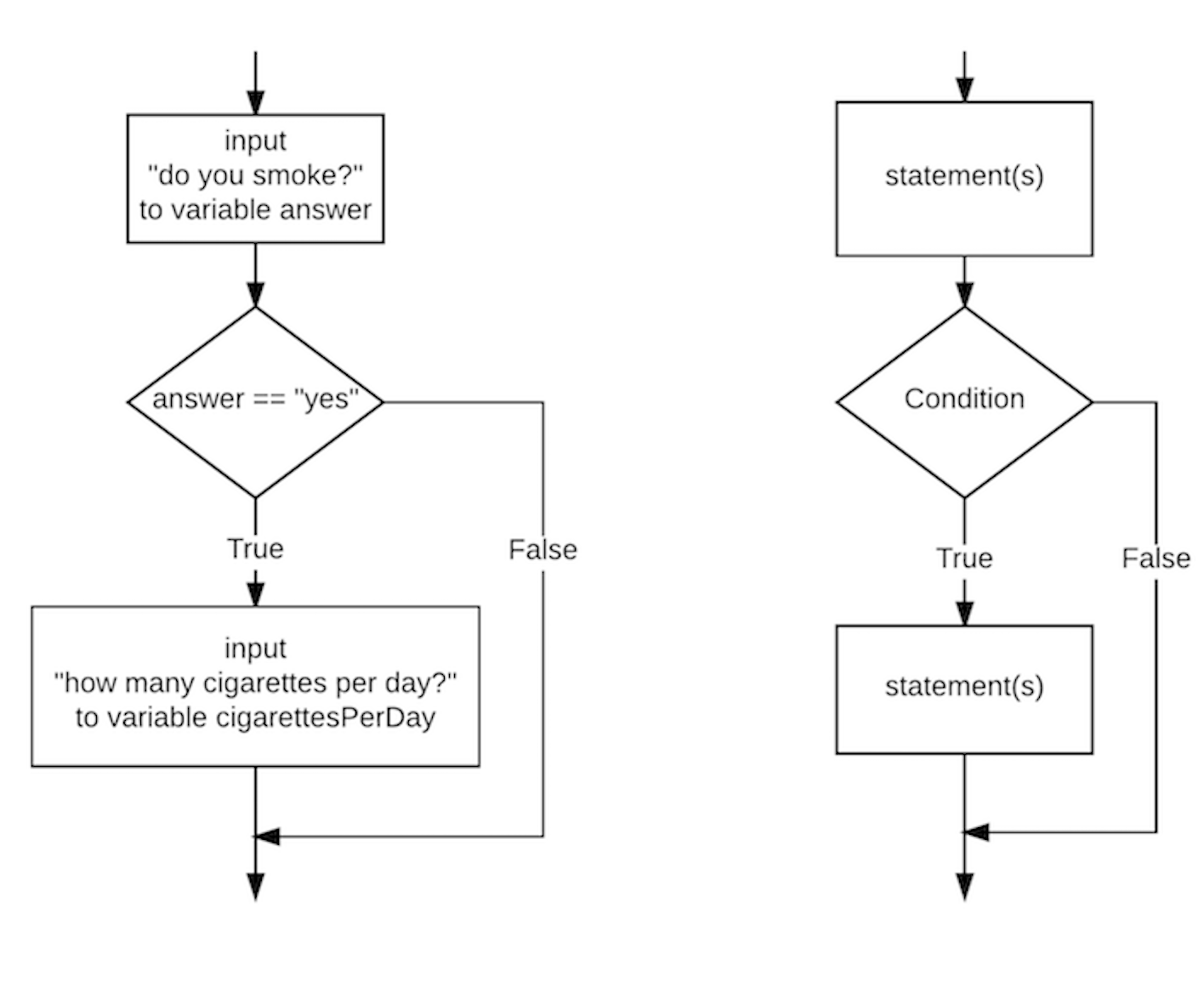
Fig. 4.2. Flowchart of fig. 4.1 in a form that can be programmed. Left: the specific smokers example. Right: the general pattern of conditions/statements.
The flowchart of fig. 4.2 translates as follows in Python:
answer = input("Do you smoke cigarettes? ")

if answer == "yes":
    number = input("How many per day? ")
    cigarettesPerDay = int(number)
    print("You smoke", cigarettesPerDay, "cigarettes per day.")
Blocks and indentation
One aspect of the if statement is important. The three statements:
number = input("How many per day? ")
cigarettesPerDay = int(number)
print("You smoke", cigarettesPerDay, "cigarettes per day.")
will either be executed all together or none at all. This concept of ‘execute-all-or-none’ is called a block-of-statements (or block-statement or block in short). Python recognizes which statements belong to the block by the indentation (number of tabs at the beginning of the line). When you increase or decrease the indentation Python assumes that the block has ended.
Conditions
Another aspect is the criterion or condition for the decision. Conditions are any expression (formula) that can be True or False. Here are a few Python examples of conditions:
answer == "yes"
age > 18
color == "black" or color == "white"
answer == "pink elephant" and lucky_number == 777
Please note the difference between assignment (=) and equality (==).
Conditions have data type bool (which can be checked by:
>>> type(answer == "yes")
<class 'bool'>
Please refer to the section on Boolean data types for more details.
4.2. If-else
The if statement is perfect for a decision on whether to do an action or not. Many times you want to decide between two alternatives. Figure 4.3 shows a flowchart of the situation where we also want a follow-up action when the person is a non-smoker.

Fig. 4.3. Flowchart of an example of a decision between two follow-up questions.
The syntax of this type of decision (choosing from two alternatives) is as follows:
answer = input("Do you smoke cigarettes? ")
if answer == "yes":
    answer = input("How many per day? ")
    cigarettesPerDay = int(answer)
    print("You smoke", cigarettesPerDay, "cigarettes per day.")
else:
    answer2 = input("Have you smoked in the past? ")
As with the if block, the else block may contain more than one statement.
4.3. If-elif-else
If a choice must be made between multiple alternatives a third variant of if: if-elif-else, comes in handy. Let’s examine this statement with a new example. Suppose the age of a person is known and the program has to classify the person into one of these life stages: “infant” (younger than 1 year), “toddler” (from 1 to 3 years old), “child” (from 3 to 15 years old), “adolescent” (from 15 to 25 years old), “adult” (from 25 to 65 years old) and “senior” (65 years and older).
We could program this decision with a combination of if-else statements:
 1answer = input("How old is the person in years? ")
 2age = int(answer)
 3
 4if age < 1:
 5    stage = "infant"
 6else:
 7    if age < 3:
 8        stage = "toddler"
 9    else:
10        if age < 15:
11            stage = "child"
12        else:
13            if age < 25:
14                stage = "adolescent"
15            else:
16                if age < 65:
17                    stage = "adult"
18                else:
19                    stage = "senior"
20
21print("This person is", stage)
Although the program will run correctly, as you can see the steady increase in indentation makes it harder to see which statements are executed and which ones are not. This phenomenon of statement-in-statement with increasing indentation is commonly known as nesting.
The case presented here (multiple options that are mutually exclusive) occurs quite frequently in programming. As a result, a special statement has been invented for this case in all major programming languages. In Python this is the if-elif-else statement. Here is the code:
answer = input("How old is the person in years? ")
age = int(answer)

if age < 1:
    stage = "infant"
elif age < 3:
    stage = "toddler"
elif age < 15:
    stage = "child"
elif age < 25:
    stage = "adolescent"
elif age < 65:
    stage = "adult"
else:
    stage = "senior"

print("This person is", stage)
The regularity of the if-elif-else structure makes it much easier to read than the nested if-else version.
4.4. When to use if, if-else or if-elif-else
It can be hard for the beginning programmer to choose between the if, if-else and if-elif-else constructions. For most problems the rule-of-thumb below will yield the correct statement.
For the decision to do a statement or block of statements (or not), use if:
if condition:
    block_statement
For a choice between two exclusive alternatives, use if-else:
if condition:
    block_statement_1
else:
    block_statement_2
For a choice between multiple exclusive alternatives, use if-elif-else:
if condition_1:
    block_statements_1
elif condition_2:
    block_statements_2
. . .

elif condition_n:
    block_statement_n
else:
    block_statement
4.5. Nesting
We want to point out to you that in principle if and if-else statements can be combined. As an example, suppose you need to combine decisions age >= 10 and age < 20 to determine if someone is a teenager.
answer = input("What is your age? ")
age = int(answer)

if age >= 10:
    if age < 20:
        print("You are a teenager.")
else:
    print("You are not a teenager.")
Like in the previous section, this way of combining multiple if statements is called nesting. With more complicated conditions the increasing indentation will make the program awkward to read. In almost all cases there is a better alternative: combining conditions. As an example, here is a more elegant solution to the teenager example above:
answer = input("What is your age? ")
age = int(answer)

if 10 <= age < 20:
    print("You are a teenager.")
else:
    print("You are not a teenager.")
As a general advice, try to avoid nesting of if, or if-else statements as much as possible. More on how to combine conditions can be found under section booleans (3.3).
© Copyright 2022, dr. P. Lambooij
last updated: Sep 02, 2022