2. Programming Basics
2.1. Introduction
The 0HV120 exercises are companion material to the 0HV120 Reader and lectures. They are meant to support students in acquiring (their first) experience in programming in Python. Mastering the programming exercises in this manual should prepare students to successfully complete the course.
Please pay attention to the italic words e.g. statement or function as they denote programming terms (that will be explained in the lectures and Reader).
These exercises support the topics covered in week 1 (roughly speaking, chapter 1 and 2 of the Reader). The exercises are mostly grouped around a particular subject (like programming calculations). Feel free to skip some exercises if you feel you have mastered that particular subject.
Before you start these exercises, make sure you have installed Python/IDLE and mastered the exercises in the section ‘1. Installation & Getting Started’.
2.2. Preliminary exercises
You will learn the most from the exercises in this section if do them in this order:
try to predict the answer by thinking about it
check if you can find your answer in the reader.
try it out in a .py script or in the interactive window.
Try to understand the result if you guessed it wrong.
This order is a fast way to learn Python.
Exercise 2.1 syntax and print()
What is the output of the following code fragments? Try to understand why your answer is right or wrong.
2.1a.
print(2 + 3)
2.1b.
print('2 + 3')
2.1c.
print('two' + 'three')
2.1d.
print('two', 3)
2.1e.
print('two' + 3)
2.1f.
print('2' + 3)
2.1g.
print('2' * 3)
2.1h.
print 2 + 3
Exercise 2.2 use of variables
A variable is a name given by the programmer to a certain piece of information, like a number or a text fragment.
It generally serves two purposes, (1) to recall earlier calculated results and (2) to keep the progam more readable.
What is the output of the following code fragments? Try to understand why your answer is right or wrong.
2.2a.
radius = 2.0
circumference = 3.1415 * radius
print(circumference)
2.2b.
brand = 'Ford'
make = 'Mustang'
print('this car is a', make, brand)
2.2c.
number1 = 10
number2 = 20
number2 = number1 + 5
number1 = number2 + 5
print(number1, number2)
2.2d.
1st_number = 3
2nd_number = 4
print(1st_number / 2nd_number)
Exercise 2.3 processing user input
What is the output of the following code fragments? Try to understand why your prediction is right or wrong. If the code does not do what it claims (in the first line), can you find the problem and fix it?
2.3a
print('I can write your name in a beautiful way :-)')
name = input('what is your name? ')
print('*****', name, '*****')
2.3b
print('I can write your name 3 times!')
name = input('what is your name? ')
print(name, name)
2.3c
print('I can calculate the square of a number!')
number = input('please enter a number: ')
square = number * number
print('square is', square)
Exercise 2.4 using round() to round-off numbers
Function round can be used to show an approximation of a decimal number.
What is the output of the following code fragments? Try to understand why your answer is right or wrong.
(Note the use of variables approx.. to break up the code into shorter lines, that are easier to read).
approx2 = round(31.41592653589793, 2)
print('10 * pi ≈', approx2)

approx1 = round(31.41592653589793, 1)
print('10 * pi ≈', approx1)

approx0 = round(31.41592653589793, 0)
print('10 * pi ≈', approx0)

approx_1 = round(31.41592653589793, -1)
print('10 * pi ≈', approx_1)

approx_2 = round(31.41592653589793, -2)
print('10 * pi ≈', approx_2)
2.3. Programming Exercises
2.3.1. Simple Calculations
Exercise 2.5 Converting ounces into grams
You want to use an old English (Victorian) recipe for cooking.
2.5a. Write a program that converts ounces into grams. One ounce is 28.3495231 grams. Here is a sample run:
please enter the number of ounces: 36
36 ounces is 1020.5828316 grams
2.5b. Numbers with many decimals are hard to read. Round off your answer to an integer result (no decimals). Here is a sample run:
please enter the number of ounces: 36
36 ounces is 1021 grams
Exercise 2.6 Converting Fahrenheit to Celcius
Imagine you want to know the weather in America where they measure temperature in Fahrenheit instead of Celsius.
2.6a. Write a program that reads degrees Fahrenheit from the console and converts it to Celsius and displays the result. The formula for the conversion is as follows:
celsius = (5 / 9) * (fahrenheit - 32)
Here is a sample run:
please enter degrees Fahrenheit: 78
78 Fahrenheit is 25.555555555555557 Celsius
2.6b. Change the output to round the number to 1 decimal. Here is a sample run:
Enter a degree in Fahrenheit: 55
55 Fahrenheit is 12.8 Celsius
Exercise 2.7 Calculating averages
In many (psychological) experiments you will have to process your results with some statistics. Averaging is one of the simplest statistical analyses.
2.7a. Write a program that asks for the age of two people and displays their average age. Here is a sample run:
please enter age 1: 19
please enter age 2: 22
The average age is: 20.5
Remark: the program crashes if you make a typing mistake, e.g. a letter in one of the numbers. Don’t worry about that for now, you will learn how to handle situations like that more elegantly later.
2.7b. Do the same for six people, rounding the result to 2 decimals. Here is a sample run:
please enter age 1: 19
please enter age 2: 22
please enter age 3: 18
please enter age 4: 25
please enter age 5: 21
please enter age 6: 20
The average age is: 20.83
Remark: You will learn more efficient ways of programming when dealing with many similar variables.
Exercise 2.8 Finding the minimum and maximum in a sequence of numbers
Python has many mathematical operations built-in as functions like abs(x) (absolute value of x) and pow(x, y) (x to the power y). A comprehensive list of all built-in functions can be found here: https://docs.python.org/3/library/functions.html.
Write a program that outputs the minimum and maximum values of 5 numbers entered by the user, using the built-in min( … ) and max( … ) functions.
Here is a sample run:
enter number 1: 6
enter number 2: 9.0
enter number 3: -14
enter number 4: 8.99
enter number 5: 3.14

the lowest number is -14.0
the highest number is 9.0
Exercise 2.9 Programming mathematical formulas
In many occasions in science and engineering you want to perform calculation of formulas using a computer, so a useful skill is the ability to convert a mathematical formula into a piece of code.
In addition to built-in Python functions (like min() and max()) many more standard mathematical operations can be used by importing module math with import math. When you type help(‘math’) in the IDLE console you can see all the functions that are supported by this module: https://docs.python.org/3/library/math.html.
2.9a. Write a program that calculates the sine and cosine of an angle, entered by the user in degrees. The math module expects angles in radians, so you will first have to convert the number with this formula:
Round-off the answer to three decimals. Here is a sample run:
please enter the angle in degrees: 40
the sine of 40 degrees is: 0.643
the cosine of 40 degrees is: 0.766
2.9b. Write a program that calculates your savings \(P_n\) after \(n\) years, when your starting amount was \(P_0\) and the yearly interest \(r\) was constant:
Here is a sample run:
enter the initial amount P0: 10000
enter the annual interest rate r: 1.5
enter the number of years n: 10

You will have 11605.41 in 10.0 years.
2.9c. Write a program that calculates the solution of \(ax^{2}+bx+c=0\) using the well-known abc formula:
Here is a sample run with the numbers rounded to 2 decimals:
enter a: 2
enter b: -4
enter c: -3

D = 40

solution:
x1 = -0.58
x2 = 2.58
Remark: The program crashes when \(D < 0\). Don’t worry about that for now, you will learn how to handle situations like that later.
2.9d. (Challenge, you may skip if you cannot handle the math) Write a program that calculates the well-known (Gaussian) normal distribution:
where \(\pi \approx 3.141592653589793\). Round-off \(P(x)\) to 6 decimals. Here is a sample run:
enter x: 2.5
enter m: 1.2
enter s: 0.5

Z =  6.76
P(2.5) = 0.000925
Hint: use math.exp().
2.3.2. Strings Manipulations
Exercise 2.10 Layout of strings in ‘columns’
When displaying multiple output lines to a console it is useful to align the data in columns. As explained in the reader, ljust or rjust can be used for that.
2.10a list of first and second names
Write a program that asks for the first name and second name of three people and then displays them in proper columns. Here is a sample run:
enter first name 1: Jan
enter last name 1: Jansen
enter first name 2: John
enter last name 2: Johnson
enter first name 3: Johan
enter last name 3: Johanson

First   Last
Jan     Jansen
John    Johnson
Johan   Johanson
For simplicity, you may assume that all first names are at most 11 characters long (see also 6c).
2.10b aligned rhyme words.
In the dutch tradition of Sinterklaas (https://en.wikipedia.org/wiki/Sinterklaas) people give each other gifts with poems. Some people will use lists of rhyme words to help with their creativity.
Write a program that first asks for four rhyme words and then displays them with aligned word endings (which makes the list more readable). Here is a sample run:
rhyme word 1: koek
rhyme word 2: broek
rhyme word 3: bezoek
rhyme word 4: zoek

rhyme words:
   koek
  broek
 bezoek
   zoek
2.10c (Challenge) Try to solve exercise 6a for first names of any length.
Exercise 2.11 extracting numbers from strings
Use slicing to extract the numbers from the following strings:
2.11a. string_a = ‘3500 ballons where popped in the world-record attempt.’
2.11b. string_b = ‘X-DSPAM-Confidence: 0.8475’
2.11c. string_c = ‘The economy has grown by 3.57% over the past year.’
Test if your code is correct in a little program.
2.11d. challenge: can you also do it if you don’t know beforehand how many characters the numbers will have? You may assume you know beforehand which character comes immediately before and immediately after each number.
Hint: you can use .find( ) and .rfind( ) to determine the start/end of the numbers.
Exercise 2.12 string manipulations
What is the output of the following code fragments?
Try to understand why your answer is right or wrong.
2.12a. Predict the value of length after execution of this code:
start = 'the apple doesn't fall'
end = 'far from the tree'
result = start + end
length = len(result)
2.12b. Predict the value of index after execution of this code:
sentence = 'Python is a great programming language.'
index = sentence.find('g')
2.12c. Predict the value of slice after execution of this code:
sentence = 'Oh wow, I love studying!'
slice = sentence[6: 10]
2.12d. Predict the value of result after execution of this code:
sentence = 'This exercise is a little bit more advanced.'
result = len(sentence) * sentence.find('little')
Exercise 2.13 The Echoing Well (dutch: Echoput)
Write a program that asks the user how many echos the well returns and the word to be echoed. Hint: you can do this with simple string manipulation. No for or while needed.
Here is a sample run
How many echos do you want? 4
What is the word? Geronimo

Geronimo ... Geronimo ... Geronimo ... Geronimo ...
2.3.3. Miscellaneous exercises
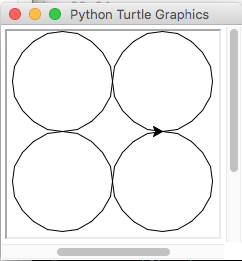
Exercise 2.14 Draw four circles
Write a program that prompts the user to enter a radius and draws four circles in the center of the screen that touch each other like shown below in a sample run with radius 50:
Exercise 2.15 Draw a square with varying size and color
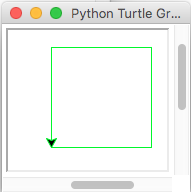
Write a program that prompts the user to enter a width and a color and draws a square with the correct width and color.
Here is a sample run with color ‘green’ and width 100:
© Copyright 2022, dr. P. Lambooij
last updated: 04-09-2022