3. Decisions
3.1. Preliminary exercises
You will learn the most from the exercises in this section if do them in this order:
try to predict the answer by thinking about it
check if you can find your answer in the reader.
try it out in a .py script or in the interactive window.
Exercise 3.1 Rectangle or square?
3.1a. What is the output of the following code fragment? Try to understand why your answer is right or wrong.
width_1  = 3.0
height_1 = 3.0
if width_1 == height_1:
    print('rectangle 1 is a square')
3.1b. What is the output of the following code fragment? Try to understand why your answer is right or wrong.
width_2  = 4.0
height_2 = 5.0
if width_2 == height_2:
    print('rectangle 2 is a square')
Exercise 3.2 Handing out cookies
3.2a What is the output of the following code fragment? Try to understand why your answer is right or wrong.
nr_cookies  = 10
nr_children = 5
cookies_per_child = nr_cookies // nr_children
print("every child gets", cookies_per_child, "cookies")
3.2b What is the output of the following code fragment? Try to understand why your answer is right or wrong.
nr_cookies  = 4
nr_children = 0
cookies_per_child = nr_cookies // nr_children
print("every child gets", cookies_per_child, "cookies")
3.2c What is the output of the following code fragment? Try to understand why your answer is right or wrong.
nr_cookies  = 10
nr_children = 2

if nr_children >= 1:
    cookies_per_child = nr_cookies // nr_children
    print("every child gets", cookies_per_child, "cookies")
else:
    print("there must be at least 1 child to give cookies")
3.2d What is the output of the following code fragment? Try to understand why your answer is right or wrong.
nr_cookies  = 4
nr_children = 0

if nr_children >= 1:
    cookies_per_child = nr_cookies // nr_children
    print("every child gets", cookies_per_child, "cookies")
else:
    print("there must be at least 1 child to give cookies")
Exercise 3.3 The traffic light
Suppose we have the following code to help decide what to do near a traffic light:
color = input("what is the color of the trafic light? ")
if color == 'green':
    print("push the gas pedal!")
elif color == 'orange':
    print("brake if you can ...")
else:
    print('slam the brake!')
3.3a What is the output if the user runs the code and enters ‘orange’?
3.3b What is the output if the user runs the code and enters ‘green’?
3.3c What is the output if the user runs the code and enters ‘red’?
3.3d (advanced, can be skipped) Does the code make a distinction between ‘red’ and an unknown color like ‘blue’? Can you modify the code so the code warns the user of an ‘unknown color’?
Exercise 3.4 The side of a square
Here are two code fragments to calculate the side of a square. They are almost identical:
# fragment 1
import math
area = float(input("what is the area of the square? "))
if area >= 0:
    side = math.sqrt(area)
    print('the side of this square =', side)

# fragment 2
import math
area = float(input("what is the area of the square? "))
if area >= 0:
    side = math.sqrt(area)
print('the side of this square =', side)
3.4a Will the code fragments below produce the same output when the user enters 16.0 or not? Why (not)?
3.4b Will the code fragments below produce the same output when the user enters a negative number or not? Why (not)?
3.2. Comparisons and Boolean expressions
Programming decisions and repetitions requires understanding of conditions and boolean expressions. This section helps you to get a better understanding quickly.
Exercise 3.5
Predict the result (True or False) of the following Boolean expressions. You may assume that x is 1.
a. True and (3 > 4)

b. not (x > 0) and (x > 0)

c. (x > 0) or (x < 0)

d. (x > 1) or (x < 0)

e. (x != 0) or (x == 0)

f. (x >= 0) or (x < 0)
Check your answers with a program or the IDLE console. If you didn’t get it right, explain for yourself why you were wrong.
Exercise 3.6
Predict the result of the following Boolean expressions, assuming x is 4 and y is 5:
a. x >= y >= 0

b. x <= y >= 0

c. x != y == 5

d. (x != 0) or (x == 0)
Check your answers with a program or the IDLE console. If you didn’t get it right, try to explain why.
Exercise 3.7
3.7a. Write a Boolean expression that evaluates to True if variable num is between 1 and 100.
3.7b. Write a Boolean expression that evaluates to True if variable num is between 1 and 100 or num is negative.
Check your answers with a little program that takes num as user input. Test at least with these input values for num: -1, 0, 1, 100 and 101. The answers should be:
 -1: (a) False, (b) True
  0: (a) False, (b) False
  1: (a) True,  (b) True
100: (a) True,  (b) True
101: (a) False, (b) False.
Exercise 3.8
Are these conditions equivalent? (Equivalent means that they are always both True or both False, no matter what the value of x is.)
x >= 1 and x < 10
1 <= x < 10
Check your answer by writing a little program that evaluates both expressions for user input of x. Test with these input values: 0, 1, 5, 9 and 10 and any other value that you think you need to prove your answer.
Exercise 3.9
Suppose, when you run the following program, you enter input 2, 3, 6 from the console. What will be the output?
x = int(input("Enter x: "))
y = int(input("Enter y: "))
z = int(input("Enter z: "))

print("(x < y and y < z) is", x < y and y < z)
print("(x < y or y < z) is", x < y or y < z)
print("not (x < y) is", not (x < y))
print("(x < y < z) is", x < y < z)
print("not(x < y < z) is", not (x < y < z))
Check your answers by running the program. If you didn’t get it right, try to understand why.
Exercise 3.10
Write a Boolean expression that evaluates to true if age is greater than 13 and less than 18. Test your expression with a little program with the following user input: 12, 13, 14 and 17, 18, 19.
Exercise 3.11
3.11a. Write a Boolean expression that evaluates to True if weight is greater than 50 kg or height is greater than 160 cm.
3.11b. Write a Boolean expression that evaluates to True if weight is greater than 50 kg and height is greater than 160 cm.
3.11c. Write a Boolean expression that evaluates to True if either weight is greater than 50 or height is greater than 160, but not both (in common english this is called either-or).
Test your ‘either-or’ piece of code in a little test program. Here is correct sample output:
weight is 48 and height is 150
either weight greater than 50 or heigth greater than 160: False

weight is 55 and height is 159
either weight greater than 50 or heigth greater than 160: True

weight is 49 and height is 162
either weight greater than 50 or heigth greater than 160: True

weight is 58 and height is 165
either weight greater than 50 or heigth greater than 160: False
If you did not get it correct, explain why not and correct it.
3.3. Programming Exercises
Exercise 3.12 The a,b,c formula revisited
The solution for exercise 5a from Basic Programming was not ideal: if \(b^2 - 4ac < 0\) then the calculation of math.sqrt() causes the program to crash (e.g. try it with a = 1, b = 2, c = 3). Let’s correct this unwanted behavior.
3.12a. Improve the program, so that if \(b^2 - 4ac < 0\) it no longer crashes, but outputs that there is no solution to the equation.
Here are two sample runs:
please enter a: 1
please enter b: 2
please enter c: 3

The equation has no solutions.
and
please enter a: 1
please enter b: 3
please enter c: 1

The equation has solutions:
x1 = -2.62
x2 = -0.38
Hint: this problem can be solved in two ways, either with two if statements, or with one if-else statement.
3.12b. additional challenge: if you want some more challenge, can you also distinguish the case where \(b^2 - 4ac = 0\) and output that there is only one solution, and printing the unique solution in that case?
Exercise 3.13 Logging in
3.13a. Write a program that asks the user to input a username and a password. It then gives feedback on whether the combination of username/password is correct or not. For simplicity you may assume there is only one user with username ‘Superman’ and password ‘Kryptonite’.
3.13b. Additional challenge: make the check on the username independent of case, for example, ‘SUPERMAN’, ‘superman’, ‘SuPeRmAn’ are all equivalent usernames.
Exercise 3.14 Addition Learning Program
3.14a. Write a program that generates two random integers under 100 and prompts the user to enter the sum of these two integers. The program then reports if the answer is correct or not.
Here is code that draws a random number between 1 and 100:
import random
number = random.randint(1, 100)
Here are two sample runs:
84 + 13 = ?
please enter answer: 97
correct!
and
57 + 22 = ?
please enter answer: 66
you need more practise!
3.14b. Additional Challenge: change the program of 3.14a to have the question and answer from the user on the same line.
Here is a sample run:
84 + 13 = 97
correct!
Exercise 3.15 Number Sorting Program
3.15a. Write a program that prompts the user to enter two integers and displays them in increasing order, without using the built-in sort( ) function.
Here are two sample runs:
number 1: 4
number 2: 5
correct order: 4 5
and
number 1: 7
number 2: 3
correct order: 3 7
3.15b. Write a program that prompts the user to enter three integers and displays them in increasing order.
Here are two sample runs:
number 1: 7
number 2: 13
number 3: 11
correct order: 7 11 13
and
number 1: 13
number 2: 7
number 3: 11
correct order: 7 11 13
Exercise 3.16 Scissors Rock Paper Game
3.16a. Write a program that plays the popular scissor-rock-paper game (dutch: steen-papier-schaar). (Scissors can cut a paper, a rock can knock a scissor, and a paper can wrap a rock.)
The program randomly generates a number 0, 1, or 2 representing scissor, rock, and paper. The program prompts the user to enter a number 0, 1, or 2 and displays a message indicating whether the user or the computer wins, loses, or draws.
Here is code to draw a random number 0, 1 or 2:
import random
number = random.randint(0,2)
Here are two sample runs:
scissors (0), rock (1), paper (2). what do you play? 1
The computer is scissors. You are rock. You won.
and:
scissors (0), rock (1), paper (2). what do you play? 2
The computer is paper. You are paper too. It is a draw.
3.16b. If you like a real challenge, try to write the program for the famous Rock-Paper-Scissors-Lizard-Spock Game invented by Sam Kass and used in the series ‘The Big Bang Theory’. In the extension Lizzard is 3 and Spock is 4. A random number is drawn by random.randint(0,4). For an extensive explanation of the game see this url: http://bigbangtheory.wikia.com/wiki/Rock_Paper_Scissors_Lizard_Spock.
Exercise 3.17 Course Identifier
In the table below you see a list of Psychology & Technology courses with their course codes.
Course Code |
Course Name |
|---|---|
0HV10 |
Introduction psychology and technology |
0HV20 |
Perception and motor control |
0HV30 |
Social psychology and consumer behavior |
0HV40 |
Brain, body & behaviour |
0HV120 |
Programming for psychology and technology |
Write a program that allows the use to enter the course code. If the code is in the table then the name is displayed, otherwise the user should get a message that the user input is not a known code.
Here are two sample runs:
Please enter the code of the course: 0HV30
The name of course '0HV30' is: 'Social psychology and consumer behavior'.
and:
Please enter the code of the course: 0HV12
I'm sorry, but '0HV12' is an unknown code.
Remark 1: can you get the interpunction right (single quotes around the codes and names without a space)? Please refer to chapter 3.1 of the reader for examples / hints.
Remark 2: you may want to create variables for the codes and the names first. This allows for much a more readable code.
Exercise 3.18 Poker Hand Classifier
In the card game of poker certain combinations of cards are more valuable than others. The figure below shows the 10 different kinds of combinations of 5 cards from most valuable (Royal Flush) to least valuable (High Card).
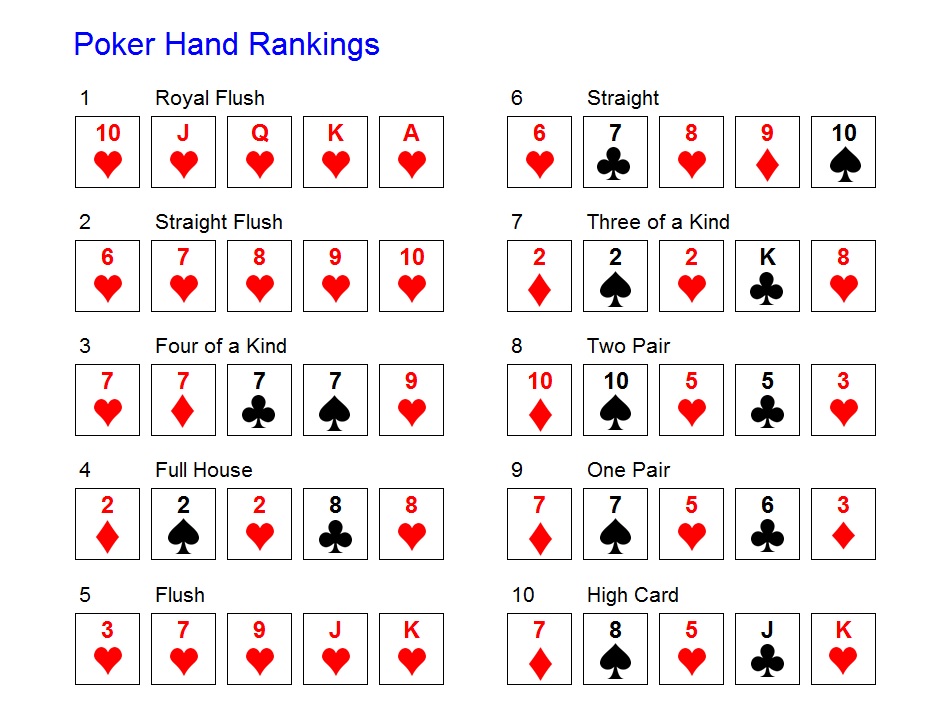
In this exercise we work with text, so we put 5 cards in one string, using letters for the suits: h for hearts (dutch: ‘harten’), d for diamonds (dutch: ‘ruiten’), c for clubs (dutch: ‘klaveren’) and s for spades (dutch: ‘schoppen’). Furthermore, the 10 is indicated by a T.
With this encoding, the poker hands in the figure become:
'ThJhQhKhAh' # example royal flush
'6h7h8h9hTh' # example straight flush
'7h7d7C7s9h' # example four of a kind
'2d2s2h8c8h' # example full house
...
'7d8s5hJcKh' # example of a high card (king high)
Write a program that analyses a hand of 5 cards like the examples above. The program should then analyse whether the hand is a flush or not and whether it is a four-of-a-kind or not.
Here are some sample runs:
Which poker hand do you want me to analyse? 6h7h8h9hTh
This hand is a flush.
This hand is not a four-of-a-kind.
Which poker hand do you want me to analyse? 7h7d7C7s9h
This hand is not a flush
This hand is a four-of-a-kind
Which poker hand do you want me to analyse? 2d2s2h8c8h
This hand is not a flush.
This hand is not a four-of-a-kind.
Exercise 3.19 Check a file name for invalid characters
In Windows 10 certain characters cannot be used for file names. The figure below shows the message that is shown by Windows 10 if the user attempts to give use one or more invalid characters in a file name.

3.19a. Write a program that allows the user to input a file name and that reports if there are any of the invalid characters (’\’, ‘/’, ‘:’, ‘*’, ‘?’, ‘”’, ‘<’, ‘>’, or ‘|’) occur in the file name. Remark: you need to write ‘\’ as ‘\ \’ in a string (no space in between), otherwise Python will interpret it as a special (escape) character instead of a normal backslash.
Here are two sample runs
Please choose a file name: exercise_3.19.py
Your file name does not contain any invalid characters.
and
Please choose a file name: exercises/exercise_3.19.py
Your file name contains at least one invalid character.
3.19b. Wite a program that does not only report if the file name is valid or not but also which invalid characters were found at each position in the name. Count in the reporting from 1, most users are not familiar with the programmers convention to start at 0. The program should stop after finding the first invalid character.
Here are two sample runs:
Please choose a file name: exercise_3.19.py
Your file name does not contain any invalid characters.
and
Please choose a file name: exercises/exercise_3.19.py
Your file name contains invalid character / at position 10
© Copyright 2022, dr. P. Lambooij
last updated: 03-09-2022