4. Repetitions
4.1. Preliminary exercises: comparisons and boolean expressions
If you have not done exercises 5 - 11 of chapter Decisions you are encouraged to do so. Programming repetitions with while requires a good understanding of conditions and boolean expressions. These exercises help you gain understanding in that respect.
4.2. Preliminary exercises: while
You will learn the most from the exercises in this section if do them in this order:
try to predict the answer by thinking about it
check if you can find your answer in the reader.
try it out in a .py script or in the interactive window.
Exercise 4.1 the ‘conversation’
print('bla bla bla bla bla ...')
answer = input('would you like to continue our conversation? ')
while answer == 'yes':
    print('bla bla bla bla bla ...')
    answer = input('would you like to continue our conversation? ')
print('I enjoyed that!')
4.1a. What would be the output if the user would enter ‘yes’, ‘yes’, ‘no’?
4.1b. What would be the output if the user would enter ‘yes’, ‘sure’, ‘no’?
Exercise 4.2 pouring tea
print('I will pour you a nice cup-of-tea.')
print('just say when ...')
print('pouring ...')
word = input()
while word != 'when':
    print('pouring ...')
    word = input()
print("You're welcome!")
4.2a. What would be the output if the user would only press return (i.e. enter ‘’)?
4.2b. What would be the output if the user would enter ‘’, ‘’, ‘stop’, ‘when’?
Exercise 4.3 the count-down timer
The following code fragment counts a number down (like an egg-timer).
nr_ticks = int(input('how many ticks? '))
while nr_ticks > 0:
    print(nr_ticks, 'ticks left')
    nr_ticks = nr_ticks - 1
print(nr_ticks, 'ticks left')
print('done!')
4.3a What will be the output when the user enters 5?
4.3b What will be the output when the user enters 0?
4.3c What will be the output when the user enters a negative integer e.g. -1?
4.3. Preliminary exercises: for
You will learn the most from the exercises in this section if do them in this order:
try to predict the answer by thinking about it
check if you can find your answer in the reader.
try it out in a .py script or in the interactive window.
Exercise 4.4 understanding the number of repetitions in a for loop
4.4a. n in range(a) with a > 0
How many lines will be printed?
for n in range(5):
    print('another line!')
4.4.b. n in range(a) if a <= 0
How many lines will be printed?
for n in range(-1):
    print('another line!')
4.4.c. n in range(a, b) with b > a
How many lines will be printed?
for n in range(2, 6):
    print('another line!')
4.4.d. n in range(a, b) with b <= a
How many lines will be printed?
for n in range(8, 8):
    print('another line!')
4.4.e. n in range(a, b, c) with c > 0
How many lines will be printed?
for n in range(6, 15, 3):
     print('another line!')
4.4.f. n in range (a, b, c) with c < 0
How many lines will be printed?
for n in range(15, 6, -3):
    print('another line!')
Exercise 4.5 understanding values of the variable in a for loop
4.5a. n in range(a) with a > 0
What will be the output?
for n in range(7):
    print('n:', n)
4.5.b. n in range(a) with a <= 0
What will be the output?
for n in range(0):
    print('n:', n)
4.5.c. n in range(a, b) with b > a
What will be the output?
for n in range(-1, 4):
    print('n:', n)
4.5.d. n in range(a, b) with b <= a
What will be the output?
for n in range(5, 3):
    print('n:', n)
4.5.e. n in range(a, b, c) with c > 0
What will be the output?
for n in range(0, 11, 2):
     print('n:', n)
4.5.f. n in range(a, b, c) with c < 0
What will be the output?
for n in range(6, 12, -3):
    print('n:', n)
Exercise 4.6. understanding for-loops in for-loops
4.6a. What will be the output?
nr_lines_printed = 1
for number1 in range(4):
    for number2 in range(5):
        print('this is line', nr_lines_printed)
        nr_lines_printed += 1
4.6b. What will be the output?
for number1 in range(7):
    for number2 in range(3):
        total = number1 + number2
        print('total:', total, end = ', ')
    print()
4.6c. What will be the output?
for number1 in range(6):
    print('number1:', number1)
    print('----------')
    for number2 in range(number1):
        print('number2:', number2)
    print()
4.6d. What will be the output?
for number1 in range(7):
    for number2 in range(7 - number1):
        print(number2, end = '')
    print()
4.4. Programming Exercises
Exercise 4.7 Improved logging-in
The logging-in program of Exercise 3.13 was not realistic in one respect. Most log-in procedures will repeat when the user does not enter valid credentials. Extend your solution of Exercises 3.13 so the program will repeat asking for a username/password until a valid combination has been entered.
Exercise 4.8 Make previous programs (more) usable
It is cumbersome to have to restart the program every time after a single action has been completed. Therefore every program needs some form of repetition to make it ‘workable’ for human beings.
4.8a Addition Learning Program 1
Extend the program of Exercise 3.14 in such a way that it will repeat until the user indicates he/she wants to stop.
Here is a sample run:
do you want an exercise? yes 36 + 26 = 62 correct! do you want another exercise? yes 75 + 5 = 81 you need more practise! do you want another exercise? no
4.8b Addition Learning Program 2
Extend the program of Exercise 3.14 in such a way that it will repeat each challenge until the user gets it right.
4.8c. Scissor Rock Paper
Extend the program of Exercise 3.16a in such a way that the user can repeat the game as many times as he/she likes.
Exercise 4.9 Turtle Circles
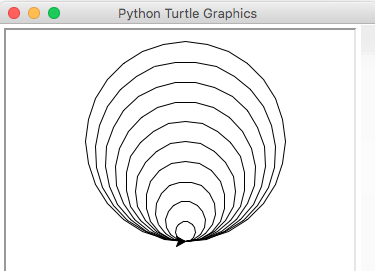
4.9a. Write a program that produces turtle output like in Figure 4. The radius of the smallest and largest circles are 10 and 100. Of course you use a loop for this!
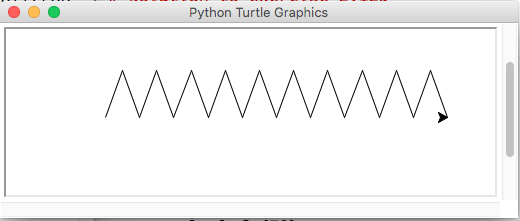
4.9b. Write a program that produces turtle zigzag output like in Figure 6. The user can enter the number of zigzags before drawing. Figure 5 show the output for nr_zigzags of 10.
Exercise 4.10 Number Guessing Game
4.10a. Write a program that asks the user for a number (between 1 and 100) until he/she guesses the secret number. The program should give feedback about whether the number is too low or too high. You may choose a fixed ‘secret’ number (e.g. secret = 77).
Here is sample output:
make a guess between 1 and 100: 66
66 is too low
make a guess between 1 and 100: 88
88 is too high
make a guess between 1 and 100: 77
77 is correct!
Test it thoroughly before continuing with b.
4.10b. Make the program of 4.10a. more interesting by choosing a random secret number. Here is code how to do that:
import random
secret = random.randint(1, 100)
Test it thoroughly before continuing with c.
4.10c. Expand the program of 4.10b. (or 4.10a. if you did not succeed with 4.10b.) to allow multiple games. Every game should have a new (random) secret number.
Here is a sample run:
do you want to guess a secret number? yes
make a guess between 1 and 100: 50
50 is too low
make a guess between 1 and 100: 75
75 is too low
make a guess between 1 and 100: 78
78 is correct!

do you want to guess another secret number? yes
make a guess between 1 and 100: 35
35 is too low
make a guess between 1 and 100: 85
85 is too high
make a guess between 1 and 100: 78
78 is too low
make a guess between 1 and 100: 80
80 is correct!

do you want to guess another secret number? no
thank you for playing
Exercise 4.11 Counting Numbers
Write a program that reads an unspecified number of integers (the input ends when the user enters 0). The program then displays:
how many positive values have been entered
how many negative values have been entered
the total value of the input values
the average value of the input values. Display the average as a floating-point number.
(Hint: remember to ignore the 0 at the end.)
Here are two sample runs:
Enter an integer (0 to stop): 1
Enter an integer (0 to stop): 2
Enter an integer (0 to stop): -1
Enter an integer (0 to stop): 3
Enter an integer (0 to stop): 0

The number of positives is 3
The number of negatives is 1
The total is 5
The average is 1.25
and:
Enter an integer (0 to stop): 0
You didn't enter any numbers.
Exercise 4.12 Turtle ‘Remote Control’
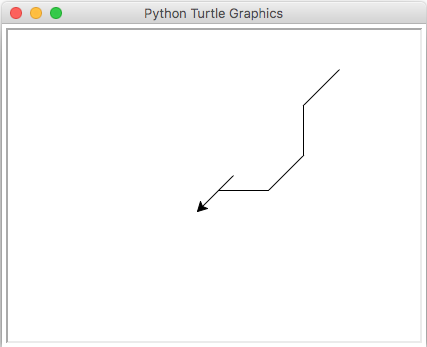
Write a program that asks the user for an actionand then lets the turtle perform that action. The program should continue until the user tells it to stop.
The actions are:
‘f’: the turtle moves 30 pixels forward
‘l’: the turtle turns 45 degrees to the left
‘r’: the turtle turns 45 degrees to the right
‘u’: the turtle lifts the pen from the canvas
‘d’: the turtle puts the pen down on the canvas
‘q’: the program quits
any other action ‘X’: the program prints “I don’t know action X”
Here is a sample run
turtle action: f
turtle action: l
turtle action: f
turtle action: l
turtle action: f
turtle action: r
turtle action: f
turtle action: u
turtle action: r
turtle action: r
turtle action: r
turtle action: r
turtle action: f
turtle action: f
turtle action: f
turtle action: d
turtle action: f
turtle action: b
i don't know action b
turtle action: q
which should produces this picture:
Exercise 4.13 loop counting exercises
4.13a. Write a program that allows the user to input the height and width of a rectangle of stars. Here is sample run for a height of 5 and a width of 7:
width: 7
height: 5

*******
*******
*******
*******
*******
4.13b. Write a program that allows the user to input the size of a triangle of stars (height and width are equal). Here is a sample run for a size of 5.
size: 5

*
**
***
****
*****
4.13c. Write a program that allows the user to input the size of a hollow triangle of stars (height and width are equal). Here is a sample run for a size of 7.
size: 7

*
 *
  *
   *
    *
     *
*******
4.13d. Optional challenge: if you want an additional challenge you can solve a, b and c by drawing stars (or circles) by the turtle.
Exercise 4.14 Number ‘triangles’
Write a program that produces the given output. Hint: use print(…, end = ‘’) to continue printing on one line.
4.14.a output:
1
12
123
1234
12345
123456
4.14.b output:
123456
12345
1234
123
12
1
4.14c output:
654321
54321
4321
321
21
1
4.14d (challenge) output:
     1
    21
   321
  4321
 54321
654321
© Copyright 2022, dr. P. Lambooij
last updated: 14-09-2022